Best Practices & Slash Commands
Master GitHub Copilot with proven techniques and powerful shortcuts that professional developers use daily.
Advanced Setup Strategies
Use the @workspace Agent
Start your prompt with @workspace so Copilot Chat can analyze your entire project and give more precise, context-aware answers.
@workspace How should I structure the authentication middleware for this Express app?
Install Real-Time Linters
Install linters like Ruff (Python) in your IDE to catch Copilot's suggestions immediately—squiggles show errors instantly!
# Linter catches issues immediately ⚠️
def problematic_function():
    undefined_variable = some_missing_import()  # Red squiggle appears
Essential Slash Commands
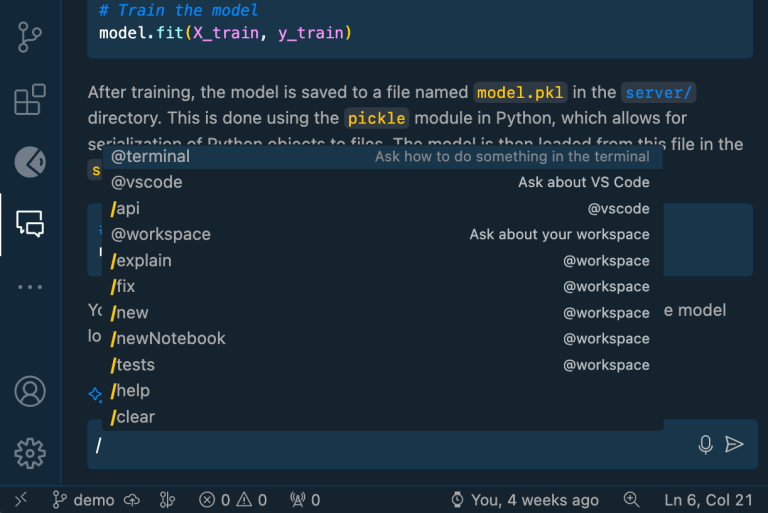
Slash commands are your secret weapon for common development tasks. Here are the most powerful ones:
| Command | Description | Example Usage |
|---|---|---|
/explain 🔍 | Get code explanations | /explain what does the fetchPrediction method do? |
/fix 🔧 | Propose fixes for code | /fix the authentication bug in login route |
/tests 🧪 | Generate unit tests | /tests create comprehensive tests for UserService |
/doc 📚 | Add documentation | /doc add JSDoc comments to this function |
/generate ⚡ | Generate new code | /generate email validation regex with error handling |
/optimize 🚀 | Improve performance | /optimize this database query for better speed |
/new 🆕 | Scaffold projects | /new create a FastAPI app with authentication |
/simplify 🎯 | Simplify complex code | /simplify this nested loop structure |
Advanced Slash Commands
| Command | Description | Example |
|---|---|---|
/newNotebook 📊 | Create Jupyter notebooks | /newNotebook analyze sales data with pandas and matplotlib |
/fixTestFailure 🔥 | Fix failing tests | Automatically detects and fixes test failures |
/clear 🗑️ | Clear chat session | /clear - Start fresh conversation |
/help ❓ | Get help | /help what can you do with API testing? |
Powerful Tricks & Agents
@terminal Agent
Generate and run shell commands directly in VS Code terminal.
@terminal create a Python virtual environment and install FastAPI dependencies
Result: Copilot generates and runs:
python -m venv venv
source venv/bin/activate  # or venv\Scripts\activate on Windows
pip install fastapi uvicorn
GitHub CLI Integration
Use Copilot within GitHub CLI for repository management.
gh copilot explain "git rebase -i HEAD~3"
gh copilot suggest "create a pull request with these changes"
Auto-Generate Documentation
Quickly create comprehensive documentation with one command.
def complex_calculation(data, weights, threshold=0.5):
    # Highlight this function and use /doc
    pass

# Result: Copilot adds complete docstring
Explain Terminal Errors
Highlight error output and choose "Explain with Copilot" for instant solutions.
# Copy this error and ask Copilot to explain:
ModuleNotFoundError: No module named 'requests'
Pro Tips for Maximum Efficiency
1. Context is King
# Keep related files open - Copilot sees all context
# models.py (open)
# views.py (open)
# tests.py (current file)

# Now ask: "Generate tests for the User model validation"
# Copilot knows about your User model structure!
2. Be Specific with Frameworks
// ❌ Generic: "Create a component"
// ✅ Specific: "Create a React functional component with TypeScript and hooks"

interface Props {
  userId: string;
}

const UserProfile: React.FC<Props> = ({ userId }) => {
  // Copilot generates TypeScript-aware React code
};
3. Leverage Conversation Memory
# First prompt: "Create a User class with validation"
class User:
    def __init__(self, email, password):
        # ... generated code

# Follow-up: "Add password hashing to the User class"
# Copilot remembers the previous context and adds to existing class
4. Use Examples for Complex Logic
# Complex business logic example:
# Calculate shipping cost based on:
# - Weight: $2 per kg
# - Distance: $0.5 per km
# - Express: +50% surcharge
# Example: calculate_shipping(2kg, 100km, express=True) -> $9

def calculate_shipping(weight_kg, distance_km, express=False):
    # Copilot generates accurate calculation based on examples
Quick Reference Card
Daily Workflow Commands:
Ctrl/Cmd + I→ Inline chat/tests→ Generate tests/fix→ Fix issues/explain→ Understand code@workspace→ Project-wide context
Troubleshooting Commands:
/fixTestFailure→ Fix failing tests@terminal→ Shell command help/optimize→ Performance improvements
- Open all related files 📁
- Use
@workspacefor context 🌐 - Start with
/generateor/new⚡ - Iterate with
/fixand/optimize🔧 - Finish with
/testsand/doc📚
Ready for advanced techniques? Check out our Agent Mode and Testing Strategies guides! 🚀